Early launch · Claude Code · Codex · opencode · API-backed agents

Pace your AI coding agents before you hit the wall.

Track your AI coding agent usage and know what to do next — before you hit limits or overspend.

Free download·$29 one-time license to unlock full pacing·macOS 13+
No accounts · No cloud · No telemetry
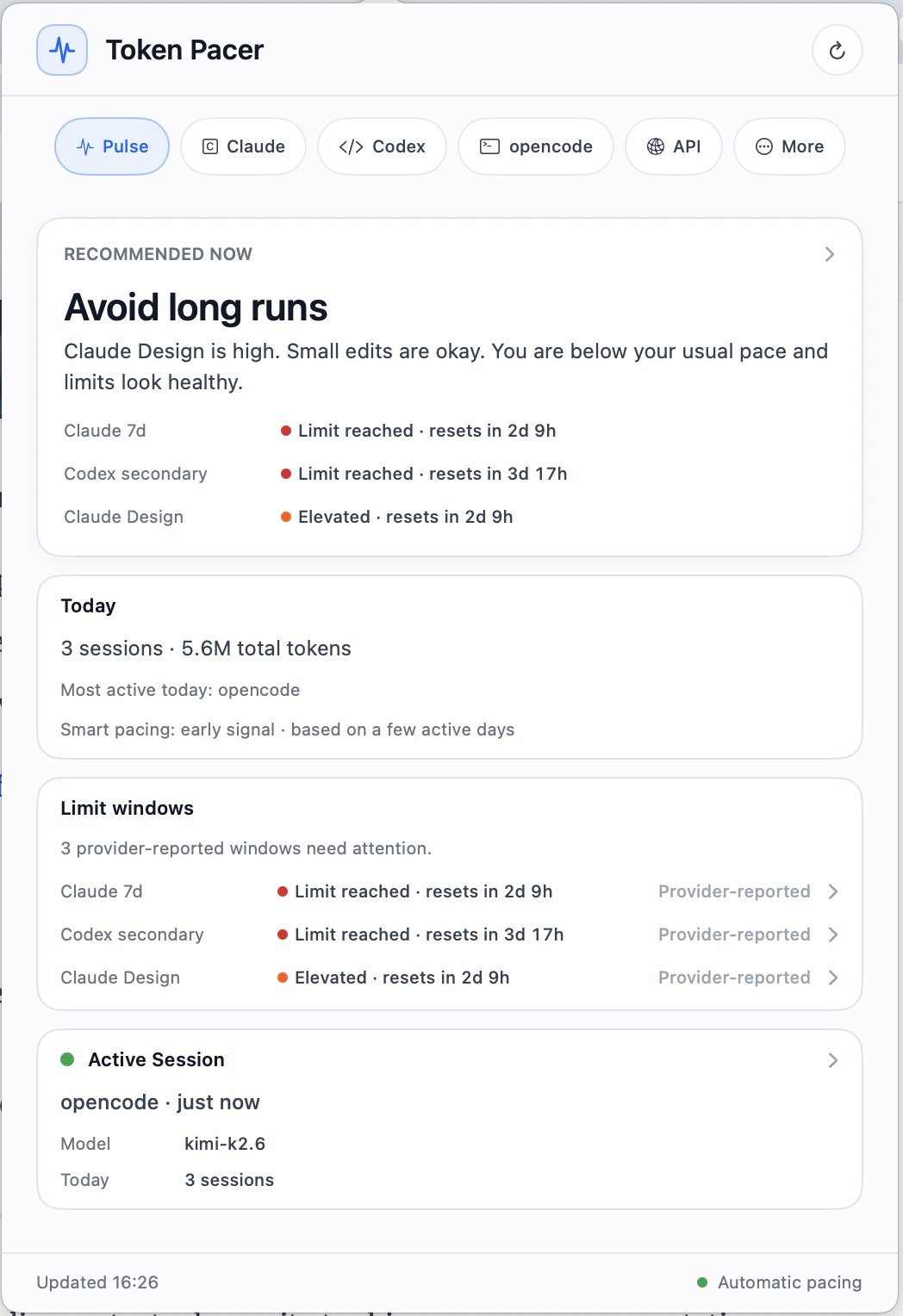
Token Pacer Pulse tab — recommended now: avoid long runs
Best Next Action
Claude 7dresets in 2d 9h
Codex secondaryresets in 3d 17h
Claude Design86% · elevated
Weekly runwayon pace

The problem

AI coding agents make it easy to sprint without noticing.

One more prompt. One more refactor. One more model switch. Then suddenly you hit a limit, burn API credits, or realize a single session consumed more than expected.

Subscription pressure
Limitscreeping up

A long coding session pushes Claude or Codex closer to a rolling limit window.

API spend rising
Spendquietly stacking

API-backed agents add cost in the background while you stay in flow.

Long session spike
Spikeone-off session

One refactor or autonomous run consumes more tokens than the rest of the day.

Reset timing
Waitor switch agents?

Know whether to wait, switch agents, or continue lightly.

The promise

Keep your AI workflow on pace.

Three signals, one decision. Token Pacer turns scattered logs and provider windows into a calm, single-screen answer to the only question that matters.

01

Today's activity

See what is happening now.

02

Limit pressure

Know when quota windows or API budgets are getting tight.

03

Best next action

Decide whether to keep going, switch agents, slow down, or wait.

Feature 01 — Best Next Action

Know what to do next.

The main tab turns scattered usage signals into a clear recommendation: keep going, switch agents, use API fallback lightly, wait for reset, or avoid long runs.

Keep using Claude Use Codex Use opencode lightly Wait for reset Avoid long runs
Pulse tab — best next action and limit windows

Feature 02 — Limit Windows

See rolling limits before they interrupt you.

Track Claude, Codex, and provider-native windows with reset timing and pressure clearly labeled. Use provider-native signals where available — local estimates only when needed, and always labeled as such.

  • Provider-reported windows where available, including Claude and Codex rolling limits.
  • Reset pressure at a glance — red for blocked, orange for elevated, green for healthy.
  • Source-of-truth labels. Provider-native, local estimate, or pricing estimate — never blurred together.
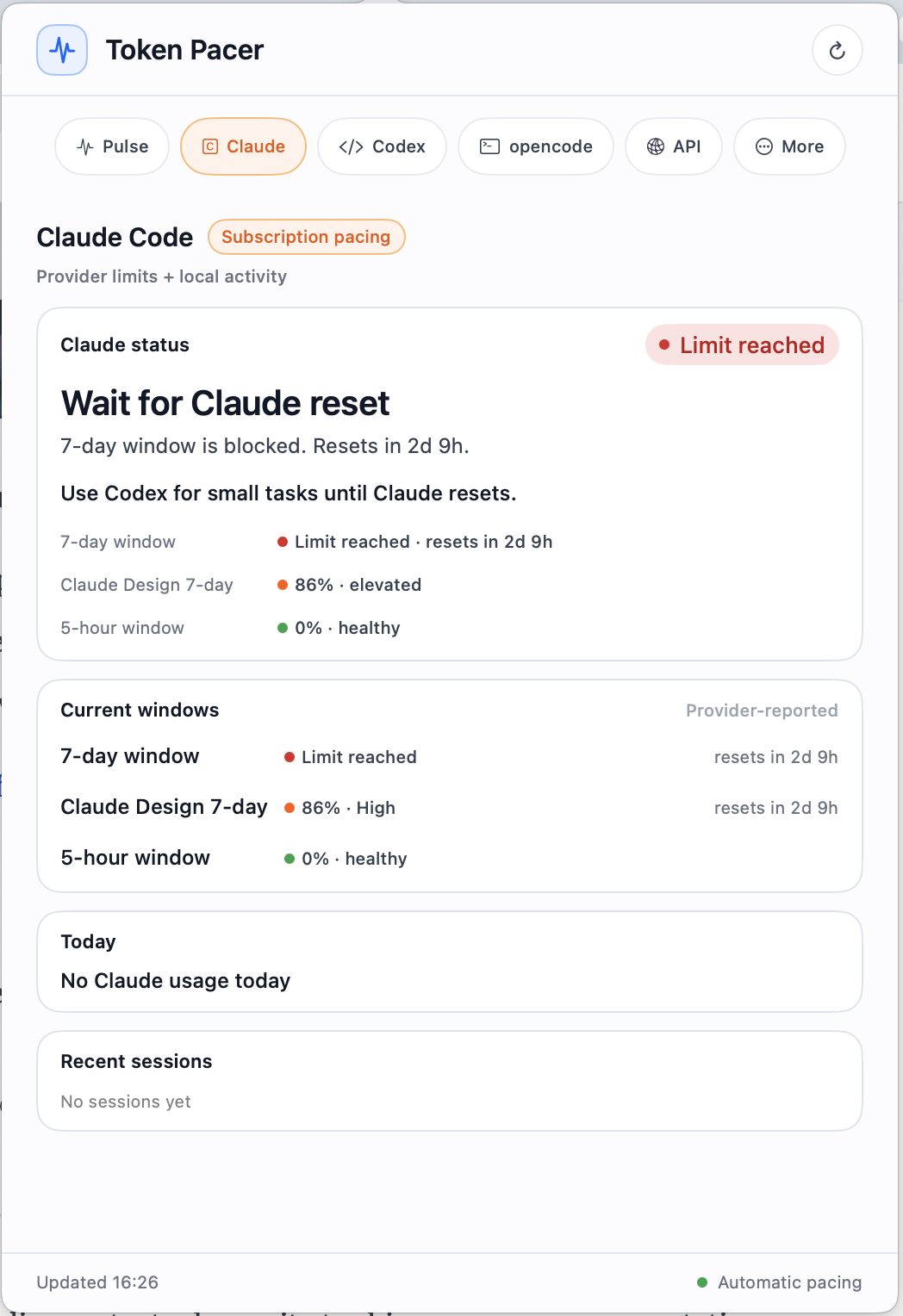
Claude tab — limit reached, current windows

Feature 03 — Weekly Runway

Know if today's pace can last the week.

Token Pacer projects whether your current usage is sustainable across API spend and subscription limit windows — so Friday doesn't surprise you on Tuesday afternoon.

7-day pacing · Tue 4:26pm on pace
MonTueWedThuFriSatSun
  • Smart pacing learns your typical working hours from local history — not a generic budget.
  • Calm projections across subscription windows and API caps, with explicit "covered by plan" status.
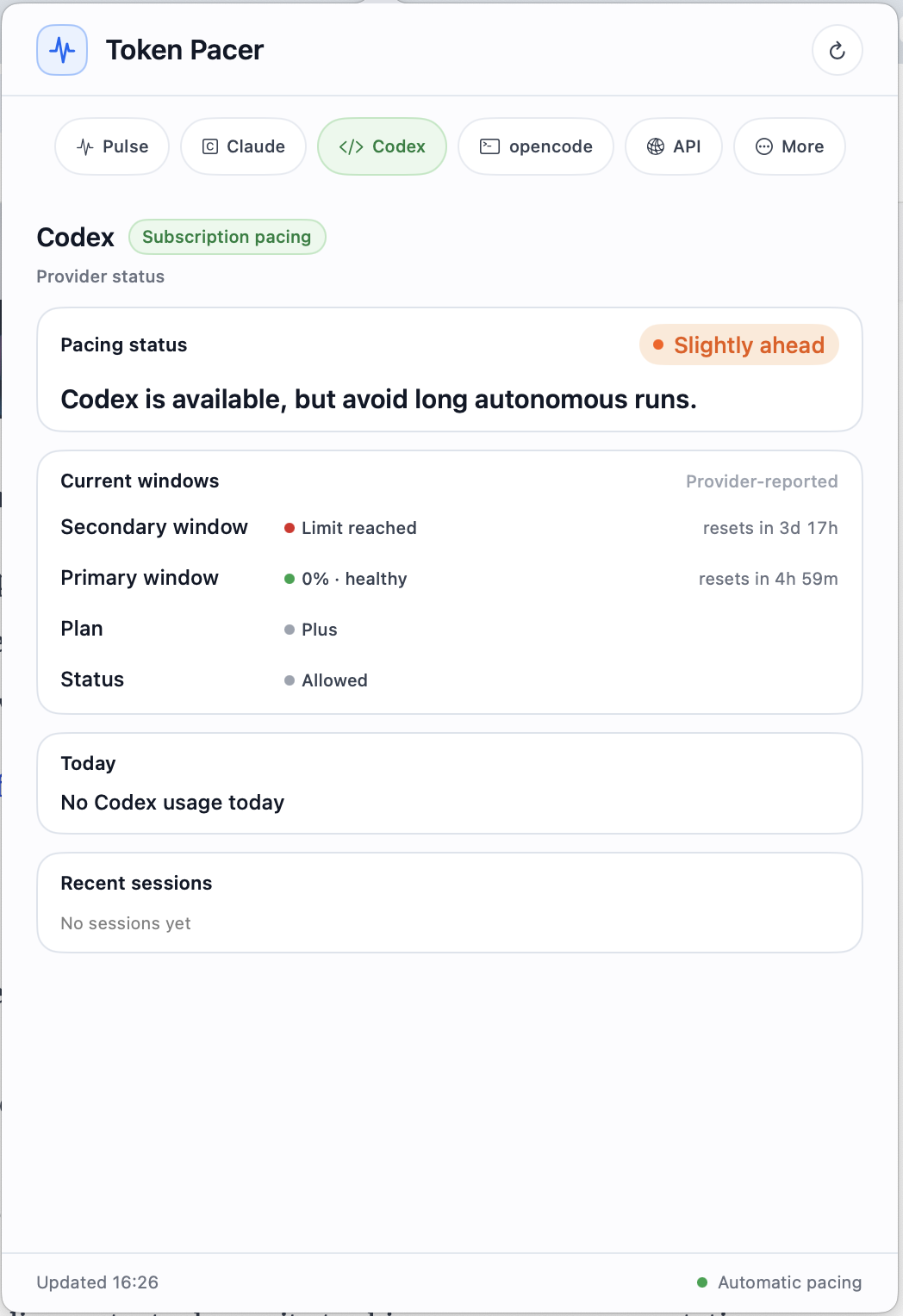
Codex tab — slightly ahead, plan and windows

Feature 04 — Recent Sessions

Find what caused the spike.

See recent agent sessions, models, projects, turns, and usage — so a long-running session doesn't stay invisible until the bill arrives or the limit lands.

  • Per-session breakdown by agent, model, and project — sortable by tokens or spend.
  • Model split — see whether kimi-k2.6, glm-5.1, or another model is doing the heavy lifting.
  • Active session badge highlights what's running right now, with last-update time.
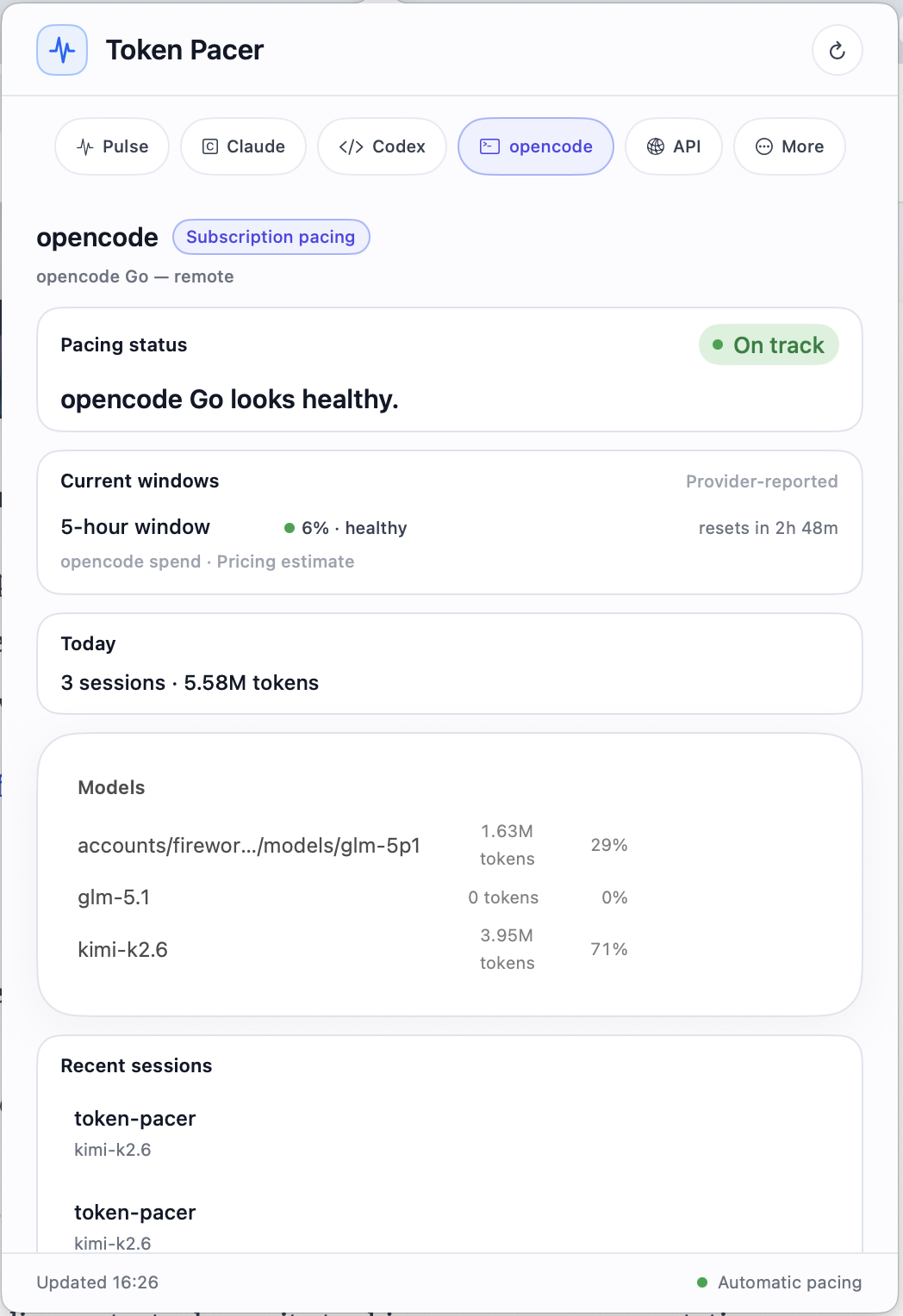
opencode tab — sessions, models, today's tokens

Local-first

Your agent logs stay on your Mac.

Token Pacer reads supported local agent logs and turns them into useful pacing signals. No account, no cloud sync, no telemetry, and no prompt or code uploads.

  • Reads local logs
  • Stores usage locally
  • No telemetry
  • No cloud dashboard
  • No prompt/code upload
  • No account required
  • Clear source-of-truth labels
  • Open Settings to inspect every source

Token Pacer watches supported local agent logs, normalizes them into usage events, and builds pacing views entirely on your Mac.

Claude Code logs local
Codex logs local
opencode logs local
Token Pacer · processes locally · stays on this Mac
no cloud · no server · no upload

Supported agents

Built for multi-agent workflows.

Pace across the agents you actually use today, with a clear roadmap for adding more as reliable local signals become available.

Claude Code

Subscription windows, usage pressure, reset timing, and local session activity. Provider-native limit windows where available.

5h · 7d windowssupported

Codex

Usage windows, session activity, plan pressure, and primary/secondary window tracking where the provider exposes it.

primary · secondarysupported

opencode & API

API spend, token usage, model costs, and budget pacing across API-backed agents and inference providers.

budget · editable pricingsupported

Supports Claude Code, Codex, and opencode first. More agents will be added as reliable local signals become available.

How it works

Local signals. Clear pacing. No cloud required.

Three steps from disk to decision — same architecture, whether you use one agent or four.

01

Watch supported local logs

Token Pacer monitors agent logs already on your Mac — Claude Code, Codex, opencode — without ever sending them off-device.

02

Normalize into usage events

Each event is the source of truth. Sessions, projects, model splits, and rollups are derived from local usage data.

03

Show today, week, and next action

Today's activity, limit windows, weekly runway, and the best next action — labeled by source and ready to act on.

Source of truth: Usage events are the lowest-level record. Sessions, projects, and rollups are all derived from local usage data — so when something looks off, you can trace it back to a single event in a single log file.

Made for flow

Built to stay out of your way.

Token Pacer lives in your menu bar, but it does not ask you to babysit another dashboard.

Smart notifications

A quiet heads-up when limits, runway, or API spend actually need attention — not for every blip.

Keyboard shortcut

Open your current pace instantly — check, decide, get back to coding without breaking flow.

P

A small glyph and a single number. Click for the full picture; otherwise it stays out of the way.

Pricing

One-time license. No heavy SaaS subscription.

Free to download. Upgrade when Token Pacer works for your workflow.

Early launch

Token Pacer License

$29 one-time Early launch license Regular price $49 after launch

One developer, up to 3 Macs. Includes all 1.x updates.


Free downloadTry first

Try Token Pacer on your Mac first.

  • Detect supported agents
  • Verify local sources
  • Preview today’s activity
  • Confirm Token Pacer fits your setup
Full license — $29Recommended
  • Best Next Action
  • Limit Windows
  • Weekly Runway
  • Recent Sessions
  • Smart notifications
  • Keyboard shortcut
  • Full local history
  • Budget & API pacing
  • 1 developer · up to 3 Macs
  • All 1.x updates included

Regular price may increase to $49 after early launch.

FAQ

The honest answers.

Does Token Pacer upload my logs?
No. Token Pacer processes supported agent logs locally on your Mac. Nothing about your prompts, code, or sessions ever leaves the device.
Do I need an account?
No account is required for local usage tracking. Buying a license gives you an unlock code, but the app itself doesn't have a login screen.
Which agents are supported?
Claude Code, Codex, and opencode first. More sources will be added when reliable local signals are available — we'd rather support fewer agents well than many poorly.
Is API spend exact?
Sometimes. If cost is recorded in the source event, Token Pacer uses that directly. Otherwise it estimates from a pricing table you can edit, and labels the result as an estimate.
Does it track Claude/Codex subscription limits exactly?
Where provider-native signals are available, Token Pacer uses them. Otherwise it shows local estimates and labels them clearly so you always know what's measured and what's inferred.
What macOS version is required?
Token Pacer requires macOS 13 Ventura or later. It is optimized for macOS 14+ on Apple silicon.
Is this for teams?
Not yet. Token Pacer is currently designed as a single-player developer utility.
How does the license work?
One license is for one developer and can be activated on up to 3 Macs. The early launch license includes all 1.x updates. Future major versions may be a separate upgrade.
Keep your AI coding workflow on pace.

Download Token Pacer and see your agent usage before it becomes a surprise.

Local-first · One-time license · Built for developers